

Using SpamFoo in SmarterMail
How to Use SpamFoo in SmarterMail: A Guide for Domain Administrators When legitimate email repeatedly lands in Junk Email, it helps to know whether you should review Trusted Senders, SpamFoo,



Recently I had a mysterious problem with duplicate files being created when I double click them to open. It also happens when I right click and open with and it seems to happen to photoshop files only.
Stationary pad is an old Macintosh option that is still lurking around. This allows the file to be duplicated when double clicked and open up the duplicate for you to work with therefore leaving the original file as a template.
So how do you remedy this action? Simple. Open a finder window and right click an effected file. Then select ‘get info’ and this window will open. Or you can find and highlight the file in finder and press command+i to ‘get info’…..gotta love those hotkeys!
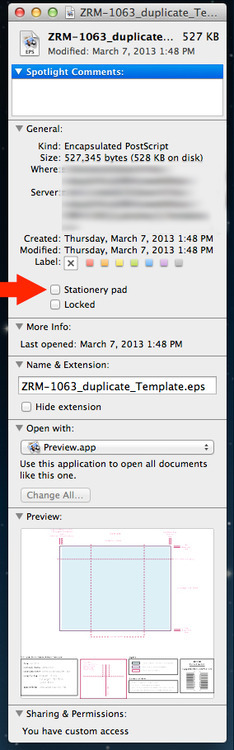
Make sure that this box is unselected and the mysterious file duplication problem is solved. I hope that this post may help someone else in the future that is encountered this issue.
Source: Skynet Solutions
By: Clint Smith
How to Use SpamFoo in SmarterMail: A Guide for Domain Administrators When legitimate email repeatedly lands in Junk Email, it helps to know whether you should review Trusted Senders, SpamFoo,

If you’re expecting an important email but can’t find it in your Inbox, there’s a chance it was identified as spam and delivered to your Junk Email folder. Spam filtering

One of the many important and useful tools included with our Enterprise class Email Software by SmarterTools is collaboration via video chat with their Team Workspaces. This feature is easily