Categories
Support

3 Things You May Need to Know When Switching to Outlook 2013

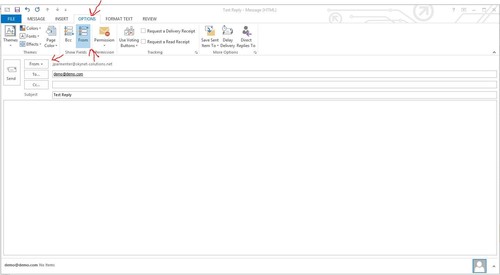
Make replies open in new windows instead of outlook: Click File above Ribbon Click Options on the left Select Mail from the list on the left Scroll down to the Replies and forwards section Check the box next to Open replies and forwards in a new window Change the from email address: Click Reply to any email Click options at top of Ribbon Then right beneath options header you see from option. Click the From option and it will highlight blue. Now a from button and line is inserted above the to line. Now simply click the from button and select other email address. Enter the address you want and there you go! Outlook will save any addresses you enter so you can use them without typing them again later.   Manually archive mailboxes/folders: Click File in upper left Select Info on left if not already selected Click Cleanup Tools next to Mailbox Cleanup and you will see the option to Archive By: Jed Parmenter Source: SkyNet Solutions

Categories
Support Uncategorized

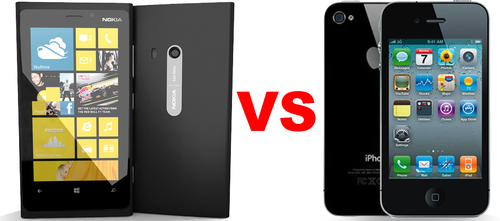
Nokia Lumia 920 Vs. iPhone 4S

Let’s not beat around the bush here; I tend to favor Apple products and software above most, regardless of specs, extra features, or buttons. My intention in this blog post is not to bash one item due to my favoritism but to compare the two operating systems and phone quality. I have been on an iPhone since iOS version 1, so I have a pretty solid understanding of iOS and its functions. I wanted to give another phone a shot, so I was given a Windows 8 powered Nokia Lumia 920 phone to use for a solid week. I will start with the phone construction.

Phone construction and attributes:

Nokia definitely knows how to make a phone. The Lumia has a nice texture to it. The casing feels sturdy and comes off as seeming rather rugged, in a good way. This may sound completely goofy, but the glass on the Lumia feels silkier; possibly because of a slight curve/bevel in the glass near the edges. All of the buttons are along the right side of the phone and are easily reached/depressed if you are holding the phone in your hands. However I was disappointed with the button placement when trying to read the time with the phone on my nightstand. The iPhone can lay flat on the surface and the home button can be located and pressed easily to view the time, while the Nokia’s phone shape causes the phone to move along the surface while you are trying to grasp the phone to get the lock screen time to show. This is minor but something I noticed on a normal basis while using the Lumia. The external speaker on the Lumia 920 was excellent. The camera is very good as well. This camera took way better low light pics than the iPhone 4S. Both phones took equally good pictures in the light of day. The call quality was good, although while talking on the phone there is a slight empty room/glass jar sound that you can hear coming back through the ear speaker. I let two other people talk on the phone to make sure I was not hearing things, and they also heard the sound that I mentioned. The microphone is fairly directional in the fact that people on the other end of the line could not hear me very well if the phone tilted the mic away from my mouth in any direction. During the one week of use on this phone, I dropped one phone call.

The Nokia, much like the iPhone, does not have an easily accessible battery. This is not a problem for me as I do not care if I can access the battery, but may be a deal breaker for some. The battery life was ok. In total, I charged this phone twice. My first battery test was to see how long the standby time could last. I left the phone on my desk prior to using it, fully charged, for 4 days. It drained about a quarter of the way but it did not have a sim card in it. The first charge lasted from Monday at 6:00 PM until Wednesday at 8:00 PM. The second charge on Wednesday has lasted until today, and we are right at 50%. The first charge was on a car charger, and the second was on a 120v plug. I feel like the second charge on the 120v plug would last as long as my normal charge on the iPhone 4S, which is about 3 ½ to 4 days.

The shape and size of the Nokia is going to be a preference. Especially when considering size. The Nokia I have is the black-cased one, and I really prefer this over the vibrantly colored casings that are offered. The black seems to hide the Zune-like shape. Again, this is a personal preference. The Nokia is ¾ of an inch larger in each direction than the iPhone 4S when squared up together in one corner. This may just be me, but as soon as I grabbed my iPhone, I was super pleased with its smaller, more manageable size. The shape of the Lumia allows for it to be more easily picked up compared to the iPhone. The curves on the sides allows the phone to slightly rock and get your fingers under or around the phone.

Software:

Now to the juicy stuff! First off I must say: hats off to Microsoft for making their own unique mobile operating system software. It’s completely their own and nothing like iOS or Android as far as GUI is concerned. Minimal UI graphics, big typography, and big, blurred background pics is a standard look for Windows 8 mobile. Most of the interface uses a side swipe function to progress through the apps’ different menus. The homepage is customizable in tile size and location. A side swipe will bring up a vertical menu of all the loaded apps. If you are totally into Windows and its Office software, this phone is for you! Office integration comes loaded out of the box with this device. Creating, editing, or grabbing files from skydrive is a breeze with the Nokia Lumia 920. If you are into Facebook this phone integrates Facebook into the phone very well, almost seamlessly. Since this phone and OS is below 10% of the market share I believe the people at Facebook really liked the way Facebook meshed with Windows 8 mobile and used this as a basis for their Facebook home integration; thats just my personal belief. You don’t have ‘contacts’ section on Windows 8 mobile but a ‘people’ section. This tile would update with pictures of friends on your homepage. I was able to hook up my Facebook account and pull in a lot of my contacts and their numbers; at least the people who list that information on Facebook. I loaded the Nokia with most of the normal apps that I generally use. The windows app store is fairly small and is missing a lot of outside company support. What I mean is John Doe may be the developer for the YouTube app not YouTube. Developers may enjoy the ability to produce apps without special software or approval but end users may feel awkwardly toward this. The Windows 8 mobile OS is fairly fluid on the phone and only lagged once or twice while I used it. The interface does not have any background graphics or bounding boxes, so certain items are harder to sort through and understand with a quick glance. Hooking up email accounts was a little more challenging than on iOS. iOS combines certain input boxes within the email account section and also gives formatting examples for incoming and outgoing mail server input boxes which made for a faster email hook up. While I was testing this phone YouTube released their own Windows 8 app and it definitely was a big step up from what other developers had on the market for download. It took the normal OS look with big type and side swipe menus and functioned a lot faster.

As a few last notes on this phone I found the screen response to be a little less than that of the iPhone 4S. Unlocking the Lumia required an upward swipe that almost always needed me to do it twice or more. Some of the interface buttons are a little too small for my liking. The send text icon/button seemed to never activate; I had to continually try to hit that button every time I sent a text message.

After my testing period ended I was happy to start using my iPhone 4S again. This is all a preference thing, much like buying cars. Some see the need in having a truck, or a fast car, or a huge gas guzzling Hummer, and its each our own choice to decide what item or product suits us best.

Source: SkyNet Solutions

Author: Clint Smith

Categories
Support Uncategorized

Goodbye LTE, Hello LTE-A

Since the dawn of time, or at least the launch of data plans on phones, we have all wanted faster speeds and the ability to do more. 3G technology brought us all something to be excited about; we were all given data speeds that allowed quicker Web browsing, music downloads, games, etc. Then we were all graced with the 4G experience on our smart phones. The difference in 3G and 4G speeds was such a huge contrast that it almost seemed unfair to own a phone or have a carrier that wasn’t 4G capable. To make this all very simple, at a minimum, you want 4G speeds if you can get them. From Facebooking, to MMO games, and now the ever more popular music downloading, you’ll see the best results with 4G. With all of the basics, the biggest thing to know is the true benefit of these increases in network technology. 3G towers average a reliable data connection to around 60-100 users. 4G, however, not only doubles that number to around 100-200 users, it also provides a dramatic latency reduction to them at the same time. When you have a network coverage like 4G that not only supports more people to any given tower, but takes care of their data requirements 10 times faster, you have a local network that manages its users far more efficiently than the latter network.

 Now let’s delve into the pure joy of using a 4G LTE network. LTE, unlike 3G and 4G, uses different frequencies that allow it to provide a dramatic increase in upload and download speeds and more intelligently control its frequency. How does that really benefit the people on its network? Think of how rush hour traffic jams can lock hundreds of cars on a busy highway all at once. Their first intentions are usually to hop on their cell phones to pass the time. 100 people using 3G and 4G phones that are all tapping into a network tower will be struggling with congestion, very slow data speeds, dropped and even missed calls. This is all due to the way these networks control data usage. In short, it’s a free-for-all where the better phones will experience the better part of the congestion. Now 100 people stuck on the highway using an LTE network will not only experience less or zero congestion, but because LTE towers use different frequencies and provide a much greater amount of data to disperse, you’ll happily get to Facebook while not having to worry about missing a call. Smarter networks are giving the consumers what they pay for.

If 3G, 4G, and 4G LTE weren’t enough to swallow, Samsung has announced it will be the first company to launch a phone with 4G LTE-A (Long Term Evolution-Advanced) that is set to be released in South Korea. LTE-A promises to provide over double the speeds that standard LTE networks are providing now. In fact, Samsung is stating it is the true standard in 4G technology. Now every bit of detail is clear on this new technology, but from what I have gathered, it will provide benefits with huge data capabilities, range expansions, an even more complex multi-frequency technology, and smaller network cells. Think of the cells like this: with a main radio signal connecting to 6 cells, it is disbursing its connections to cellular devices as they are in range. Old technology not only has less cells that are larger, they stay active even when there is no requirement for their use. The new Smaller Cell approach will have more cells that are smaller, combined with range expansion packs. This allows the pass off in a network at an almost constant state to provide the best connection possible at all times, and at a further distance than previously allowed. Here’s the greatest part of how LTE-A is going to make networks more reliable: these smaller cells, unlike current cells, go into a dormant state when there is no demand on them to disburse a signal. So instead of wasting data on 6 cells that are constantly on, providing a less reliable call and data experience, you have a 6 cell area that can have only 3 actually needing to be active. So people in range of those 3 cells are getting all that the main network tower has to offer because it’s not wasting its radio transmission to 3 cells that aren’t even being used. In a nutshell, this means you are getting all the performance your LTE-A connection has to offer, all the time. With its expected multi-carrier tower connections providing extremely high data peaks of 1 Gbps, even in the off chance your network is overrun at one time, you’ll be able to happily use your mobile device with blazing fast speeds. Oh! Did I happen to mention LTE-A has an average download rate of 150 Mbps? Ya…Wow!

 We will be waiting, though, for this technology to roll out in the states because we are just maximizing our standard LTE potential as of now. But knowing we are becoming more consistent with technological upgrades, more so in the cellular world, I’d expect small LTE-A markets to start rolling out by the end of 2014. Till then, though, we will have to make do.

Source: SkyNet Solutions

By: Chris Raines

Categories
Support Uncategorized

Nintendos Wii U Performance….Impressive!

Nintendo’s Wii U Performance…Impressive!

With the announcement of both the Xbox One and PlayStation 4, we were all left mind-boggled at what they are shoving into these bad boys in terms of hardware. Let’s recap quickly here.

PlayStation 4

CPU: x86-64 AMD 8 core

GPU: 1.84 TFLOPS, AMD Radeon Sky Series

Memory: 8GB DDR5

Xbox One

CPU: x86-Microsoft Custom 8 core processor

GPU: (Reported a 7xxx AMD Radeon)

Memory: 8GB DDR3

We can take a look at these specs and see both Sony and Microsoft have taken these past years to make sure when their next systems launched, they hit the stratosphere! But who is talking about the Wii U? We keep seeing sites like IGN, GameFAQs, and about every tech site talking about how doomed Nintendo is with the Wii U, and why it even has a system so far behind in the times. Folks…this is Nintendo we are talking about here. Have they ever really tried to graphically blow our minds? Have they ever tried to add this or that to stay up to speed with everyone else? The answer to all the above is no…until now.

One thing to note right off the bat is Nintendo integrating a 1080p capable GPU in their newest system.

It’s not only a smart choice, but it actually makes more sense than the majority realizes. Who could forget when the N64 launched, and we all got to experience the visual and gaming masterpiece that is The Legend of Zelda: Ocarina of Time? Nintendo managed to keep rolling out game after game after game that won gamers hearts, but they were all polygonal and simplistic at the same time. Fast forward to 2012 as the Wii U launches. People are wondering how the Nintendo’s new 1080p system will compare to the competition. It not only holds its own, but it displays graphics no one could have ever anticipated from Nintendo.  This is all possible from IBM’s ‘Espresso’ CPU and AMD’s custom GPU codenamed ‘Latte,’ which was designed for the Wii U specifically. With a CPU at a mere 1.24Ghz and a GPU running a 554Mhz, this system manages to play gorgeous full HD games that move fluidly with virtually zero motion lag.

I’ll end with this note. I’ve owned both the Xbox 360 and PlayStation 3. Yet somehow even with the Wii U having the ‘behind the times’ hardware, I’m more impressed by both the processing and graphical capabilities of the Wii U than I am with both of the other systems. It took Sony 5 years to start unlocking the PS3’s full potential; similar can be said about the Xbox 360, but if Nintendo’s new system has already shown to be this impressive in just a few months, then we can expect its future to hold some of Nintendo’s greatest feats yet!

Categories
Support Uncategorized

Embedded Images using FPDF and Classic ASP

When creating dynamic PDFs in ASP, we typically use the FPDF procedure. I received a task to create a dynamic coupon, so what’s the first thing I do? Implement FPDF of course.

After formatting the coupon, I began to test. Upon testing I encountered unusual errors. The PDF format was being corrupted seemingly by the background image. After some research, even the procedure documentation had no reference to this type of issue, leaving me no good source for troubleshooting.

After reaching a level of increased frustration, I came to the realization that some aspect of FPDF requires a fully-qualified domain name. So if you are using this procedure to develop dynamic PDFs and begin encountering unusual problems, simply upload it to a live server before going “Office Space” on your PC.

Source: Skynet Solutions

By Matt Maennche

Categories
Support Uncategorized

KINDLE VS IPAD MINI

Which is the best tablet for someone who loves to read?

My wife let me know for Christmas she’d like to have a tablet for reading. I have an iPad2 that she has used a few times, but she really needs to have her own device. And she needs something smaller than a full-size tablet to make it easy to take along in her purse.

E-READERS vs TABLETS

There are many e-readers on the market. Since they all have the same primary reason for existing, they have a lot of similarities. There are already plenty of reviews out there comparing the various e-readers, and the Kindle Paperwhite seems to currently be at the top of most lists because of its superior screen. At 212 pixels per inch, it’s the sharpest, clearest e-reader display currently on the market. And the price is very reasonable at $119, or $139 for the ad-free version. The reviews also suggest the huge resources of reading material available within the Amazon system have a lot to keep a reader happy, including thousands of older books available free of charge.

THE BATTLE

But wait, “What if I want to surf the web or play a game,” you ask. That’s what I was wondering too. And since my wife and I are both deeply immersed in the Apple universe (MacBooks, iPhones, iPad), the logical choice to compare would be the new iPad mini. So it all quickly boiled down to a battle between the Kindle Paperwhite and the iPad mini.

At first, it seems like an unfair fight of course, the mini is so much more capable. Yes, it costs more, starting at $329, but look at all the legendary awesomeness that comes with it! You can surf the web, play games, check your email, watch movies, take photos or video, type a document, edit images, talk via face time, listen to music, write a song, etc., etc., etc. in perpetuity. And the display is fantastic at 326 pixels per inch.

How could anyone need to think twice given all that? But I have to keep sight of the whole purpose of my quest….to find a gift that conforms to my wife’s Christmas wishes! Her primary focus for this device is reading. And there is a huge elephant in the room when it comes to tablets. She (and many others out there) has a hard time staring at a backlit display for long periods of time. And let’s face it, reading a regular old-school paperback book is a lot easier on the eyes than looking directly into a light for hours, albeit a dim light.

The screen on the new Kindle Paperwhite is not backlit. The light is emitted from the sides, pointing toward the middle of the screen, and the reading material or images are produced in a lower layer. This shines light on the words from the reader’s side rather than from behind the screen, producing an actual book-like experience that is much easier on the eyes, and yet unlike some e-readers, can still be used at night.

CONCLUSION

My wife already has an iPhone and a MacBook to do all those other legendary things mentioned above. And if reading is your primary goal as it is here, all the awesome computer features in the world won’t be enough to compensate for an annoying light shining in your eyes while you’re trying to read. Many people don’t seem to be bothered by this backlit screen issue. But many others are, and my wife is one of them. So in this case, the Kindle Paperwhite has won the battle. Christmas wishes granted if I can get one in time.

AVAILABILITY

If you’re thinking about giving a Kindle Paperwhite for someone’s Christmas wish, better do it soon. They seem to be selling out everywhere. As of writing this article, Amazon is promising to ship by Dec. 21st in time for Christmas with free 2-day shipping for a limited time. (Their website says “to ensure delivery by December 24th, choose Two-Day Shipping at checkout. I did so, and in fact, 2-day shipping ended up being FREE, which shows up at the end of the check-out process. Good luck, and Merry Christmas to you and your favorite reader!

Source: Skynet Solutions

Author: Joel Eads